From Messy to Managed: How a Virtual Assistant Transforms Your Business Back-Office Chaos
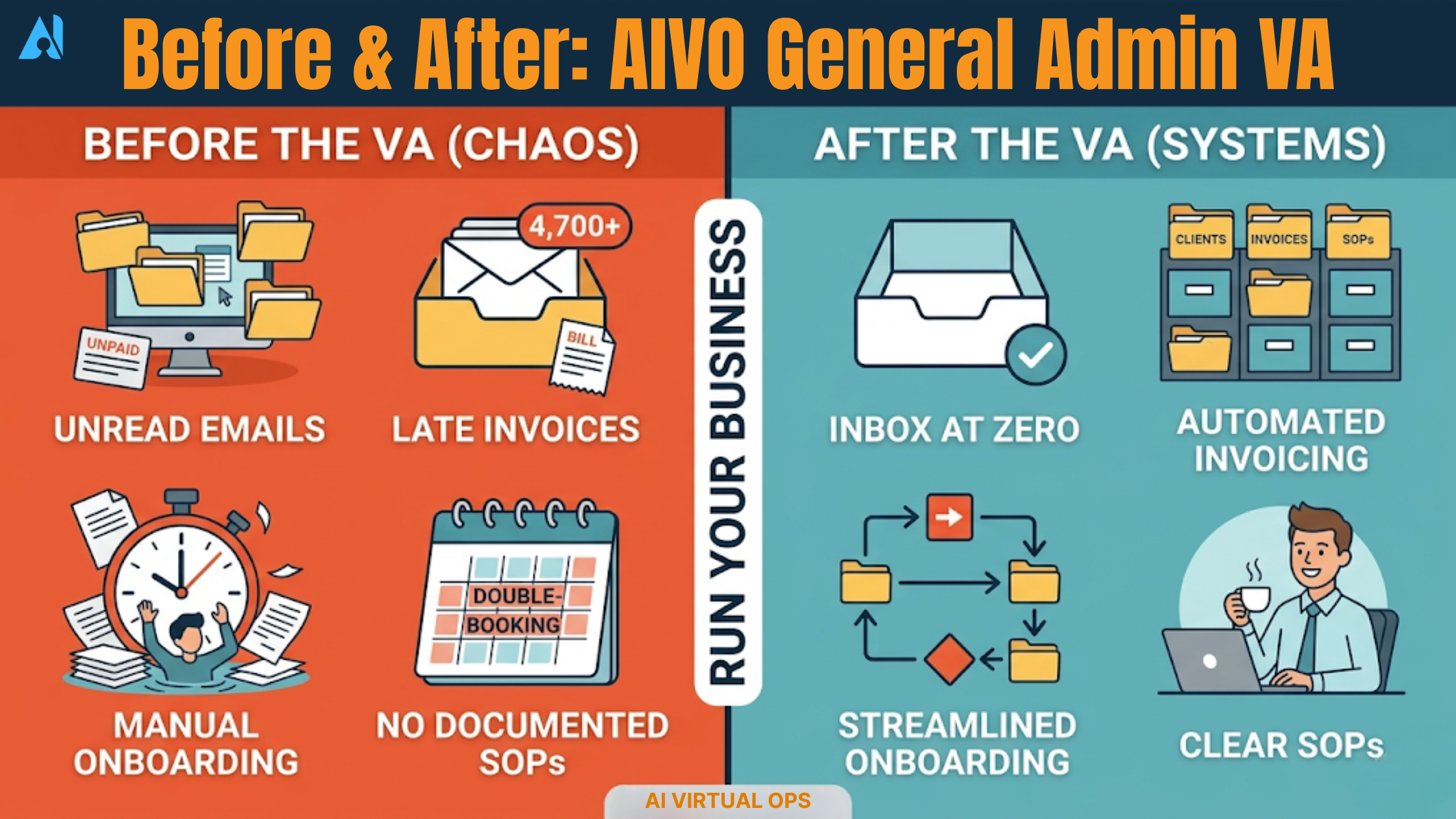
A before-and-after look at exactly how an AIVO General Admin VA audits, organizes, and automates the systems your business runs on — so you can finally run your business.
Let's be honest. If you're a business owner running a small or growing company, there's a good chance your back office looks less like a well-oiled machine and more like a filing cabinet that's been through a hurricane. Unanswered emails. Forgotten follow-ups. Invoices buried in inboxes. Systems that exist — sort of — but only in your head.
You started your business to do the work you love. Instead, you're drowning in the administrative underbelly that keeps every business alive but rarely gets the attention it needs. The irony? The very systems that should be supporting your growth are the ones quietly suffocating it.
This is where an AIVO General Admin Virtual Assistant comes in — not just as an extra pair of hands, but as a strategic partner who walks into your operational chaos, makes sense of it, and rebuilds it into something that actually works.
Here's exactly what that transformation looks like.
15+ Hours reclaimed weekly by business owners who hire a VA
78% Of small businesses report operational inefficiencies due to poor admin systems
3× Faster client onboarding after VA-built automation workflows
The Back-Office Reality Check: What "Chaos" Actually Looks Like
Before we talk solutions, let's name the problem clearly. Back-office chaos doesn't always look dramatic. It rarely announces itself with flashing warning lights. It shows up quietly — in the small ways your business bleeds time, money, and credibility every single day.
Meet a composite portrait of a typical AIVO client at intake: Sarah is a consultant with a six-figure business and a team of three. She's good at what she does. Her clients love her. But behind the scenes, her business runs on a patchwork of sticky notes, an overflowing Gmail inbox with 4,700 unread messages, a Google Drive with folders named "NEW FINAL v3 REAL," a CRM she hasn't logged into in two months, and an invoicing system that still relies on her personally chasing payment emails.
Sound familiar? You're not alone — and you're not failing. You've just been too focused on doing the business to build the business.
⊘ Before the VA:
4,700+ unread emails, zero triage system
Invoices sent late or forgotten entirely
Client onboarding done manually every time
No standard operating procedures documented
Files stored inconsistently across 3 platforms
Calendar double-bookings and missed follow-ups
Owner spending 3+ hours/day on admin tasks
✓ After the VA
Inbox at zero with tiered response templates
Automated invoicing with payment reminders
Fully automated onboarding workflow in place
SOPs documented for every recurring task
Single-source file structure across one platform
Scheduling system with automated confirmations
Owner spends 30 min/day reviewing, not doing
Phase 1: The Audit — Seeing the Whole Battlefield
The first thing an AIVO General Admin VA does is not start fixing things. That's a common misconception. Jumping straight into solutions without understanding the landscape is how businesses end up with new systems that are just as broken as the old ones, only shinier.
Instead, the VA begins with a comprehensive operational audit — a structured diagnostic of every touchpoint in your back office. This typically takes five to seven business days and covers the following areas:
01 Communication Infrastructure
Every inbox, email account, communication platform (Slack, Teams, WhatsApp), and contact management system is reviewed. The VA maps how information flows in and out of the business — and more critically, where it stalls, gets lost, or creates bottlenecks.
02 File & Document Architecture
A full inventory of where documents live, how they're named, and who can access them. In most small businesses, the VA discovers three to five platforms being used simultaneously with no consistent naming convention — leading to version confusion and hours lost searching for files.
03 Financial Workflows
Invoicing schedules, accounts payable processes, expense tracking, and payment follow-up systems. Research by Intuit shows that 60% of small businesses struggle with cash flow — and late invoicing is a top culprit. The VA maps every step of the money-in/money-out cycle.
04 Client-Facing Processes
How new clients are onboarded, how projects are tracked, how deliverables are communicated and delivered. Every touchpoint that shapes client experience gets documented — from first inquiry to final invoice.
05 Recurring Tasks & Time Drains
A time audit of the owner's week. Where are you spending your energy? A McKinsey study found that executives spend an average of 16% of their time on tasks that could be automated. The VA identifies every repetitive, rule-based task that is eating your hours.
The output of this phase is a clear Operational Audit Report — a document that maps your current state, identifies the top 10–15 problem areas, and prioritizes them by impact. For the first time, you see your back office not as a vague source of stress, but as a concrete map of solvable problems.
Phase 2: Organize — Building the Foundation
With a clear picture of the landscape, the VA moves into the organization phase. This is where the visible transformation begins. Systems are restructured, folders are rebuilt, and the chaos is given a shape.
Inbox Architecture
A good VA doesn't just "clean up" your inbox — they install a triage system designed to survive the long term. This means building folder and label structures that mirror how information actually flows in your business, creating templated responses for the top 15–20 email scenarios you face repeatedly, setting up filters that route incoming mail automatically, and establishing a daily inbox review protocol that takes 20 minutes, not two hours.
For one AIVO client — a real estate broker processing over 80 emails a day — this restructuring alone saved an estimated 11 hours per week.
Document Structure & File Management
The VA consolidates your files onto a single primary platform (typically Google Drive or SharePoint), establishes a universal naming convention (e.g., YYYY-MM-DD_ClientName_DocumentType_v1), builds a folder hierarchy that mirrors your business structure, and migrates and reorganizes legacy files. Version chaos becomes a thing of the past. Every team member — and every future VA — can find what they need in under 30 seconds.
CRM Clean-Up and Contact Management
A dead CRM is often worse than no CRM — it creates false confidence. The VA audits your CRM data, removes duplicates and ghost contacts, updates and standardizes client records, and maps the stages of your pipeline to match how your business actually works. According to Salesforce, businesses with a properly maintained CRM increase sales productivity by up to 34%.
What gets organized in a typical first month
Email inbox taken from 4,000+ unread to zero, with a maintenance system in place
All client files consolidated and renamed across a single folder structure
CRM cleaned, with contact records standardized and pipeline stages defined
Recurring calendar blocks scheduled for reviews, check-ins, and admin batching
Master password/credential manager set up and populated
Weekly task tracking system implemented in Notion, Asana, or ClickUp
Phase 3: Automate — Making the System Run Itself
Organization creates clarity. Automation creates freedom.
Once the foundation is solid, your AIVO VA begins building the automated workflows that turn your back office from a machine that needs constant feeding into one that largely runs itself. This is where the ROI becomes impossible to ignore.
Client Onboarding Automation
Manually onboarding a new client is expensive. Between sending welcome emails, setting up project folders, sharing contracts, collecting intake forms, scheduling kickoff calls, and adding them to your project management tool — the average business owner spends 3–5 hours per new client on tasks that follow an identical pattern every time.
An AIVO VA builds an onboarding automation using tools like HoneyBook, Dubsado, or a custom Zapier workflow that triggers the entire sequence automatically when a new client is tagged in your CRM. Contract sent. Welcome email delivered. Folder created. Kickoff call link shared. All while you focus on the actual work.
Invoicing and Payment Reminders
Late payments are a cash flow killer, and chasing them is demoralizing work. The VA sets up an automated invoicing system through platforms like FreshBooks, QuickBooks, or Wave that sends invoices on schedule, follows up at 7, 14, and 21 days overdue, and notifies you only when human escalation is required. Businesses that automate invoicing and reminders reduce average payment time by up to 29%, according to FreshBooks data.
Scheduling Systems
The endless "what time works for you?" back-and-forth ends here. The VA installs Calendly, Acuity, or a similar tool, syncs it with your calendar, sets buffer times and availability windows, and creates different booking types for discovery calls, client check-ins, and team meetings. A confirmation and reminder sequence is attached to each booking automatically.
Recurring Reporting and Data Aggregation
If you're currently spending the first hour of your Monday pulling together weekly numbers from five different places, that stops now. The VA builds automated dashboards or scheduled reports (using Google Data Studio, Notion databases, or Zapier aggregators) that deliver your key business metrics to your inbox every Monday morning — no assembly required.
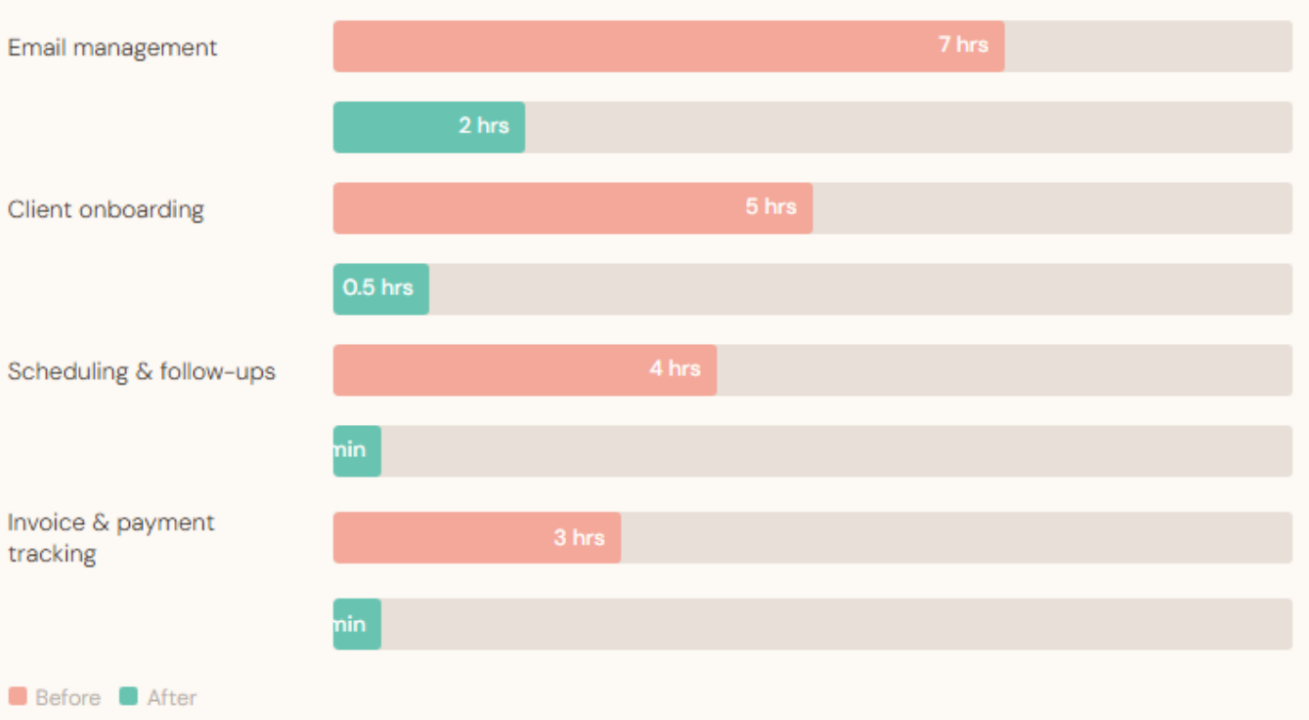
Weekly hours before vs. after VA optimization
The Compounding Effect: When Systems Multiply Growth
Here's what most business owners don't anticipate: the ROI of organized, automated back-office systems isn't linear — it's compounding.
When your client onboarding is automated, you can take on more clients without proportionally increasing your admin hours. When your invoicing runs on autopilot, your cash flow improves predictably rather than sporadically. When your files are structured and your CRM is clean, you can bring on a new team member and have them fully operational in a day instead of a week. Every system your VA builds becomes a multiplier on everything that comes next.
A 2023 survey by Time Etc found that business owners who hired a VA reported a 30% increase in revenue on average within the first 12 months — not because the VA was doing revenue-generating work, but because the owner finally had the time and mental clarity to focus on it.
There is also the less-quantifiable but equally real benefit of confidence. When you know your back office is in order — when you can answer any client question within 30 seconds because your systems are clean, your files are accessible, and your team knows the process — you show up differently. You pitch bigger clients. You raise your rates. You take the meeting you would have previously declined because you were too overwhelmed to follow through.
What to Look for in a General Admin VA
Not all virtual assistants are built for this kind of systemic, architectural work. An entry-level VA can handle task execution — answering emails, scheduling appointments, data entry. A General Admin VA from AIVO operates at a higher level: they think in systems, communicate in plain language, and take ownership of outcomes rather than just tasks.
When evaluating whether a VA is equipped for back-office transformation work, look for demonstrated experience with project management tools (Asana, ClickUp, Notion), automation platforms (Zapier, Make/Integromat), CRM systems (HubSpot, Dubsado, HoneyBook), and cloud file management. More importantly, look for someone who asks the right questions before they start building — because the best VA in the world can't transform your systems without first understanding your business.
That diagnostic curiosity is what separates a task-doer from a systems builder. And a systems builder is exactly what your back office needs.